Let your AI check your board every morning
A weekday briefing from your own AI: what changed, what it updated, and what needs you today.
Your AI can open your boards before you do. A scheduled task in your AI app runs a saved prompt at the times you pick, with the connectors you added. Each weekday morning it reads your boards through Listspace, makes the changes your agent access level allows, and leaves you a short list of what needs you today.
Which apps can do this
- Claude: scheduled tasks can use your connectors, Listspace among them, on the paid plans (Pro, Max, Team and Enterprise). They run remotely, so your computer may be asleep. See Schedule recurring tasks in Claude's help.
- Claude Code:
/schedulesets up a scheduled task that uses the connectors on your claude.ai account, on the same plans. See scheduled tasks in the Claude Code docs. - ChatGPT and Gemini have scheduled tasks too, but their help pages do not say that a scheduled run can use an app you added yourself, such as Listspace. Gemini also asks you to confirm each change a custom app makes. Use the prompt in step 4 there.
1. Connect Listspace and pick a level
- Add Listspace to Claude once, with the step by step setup.
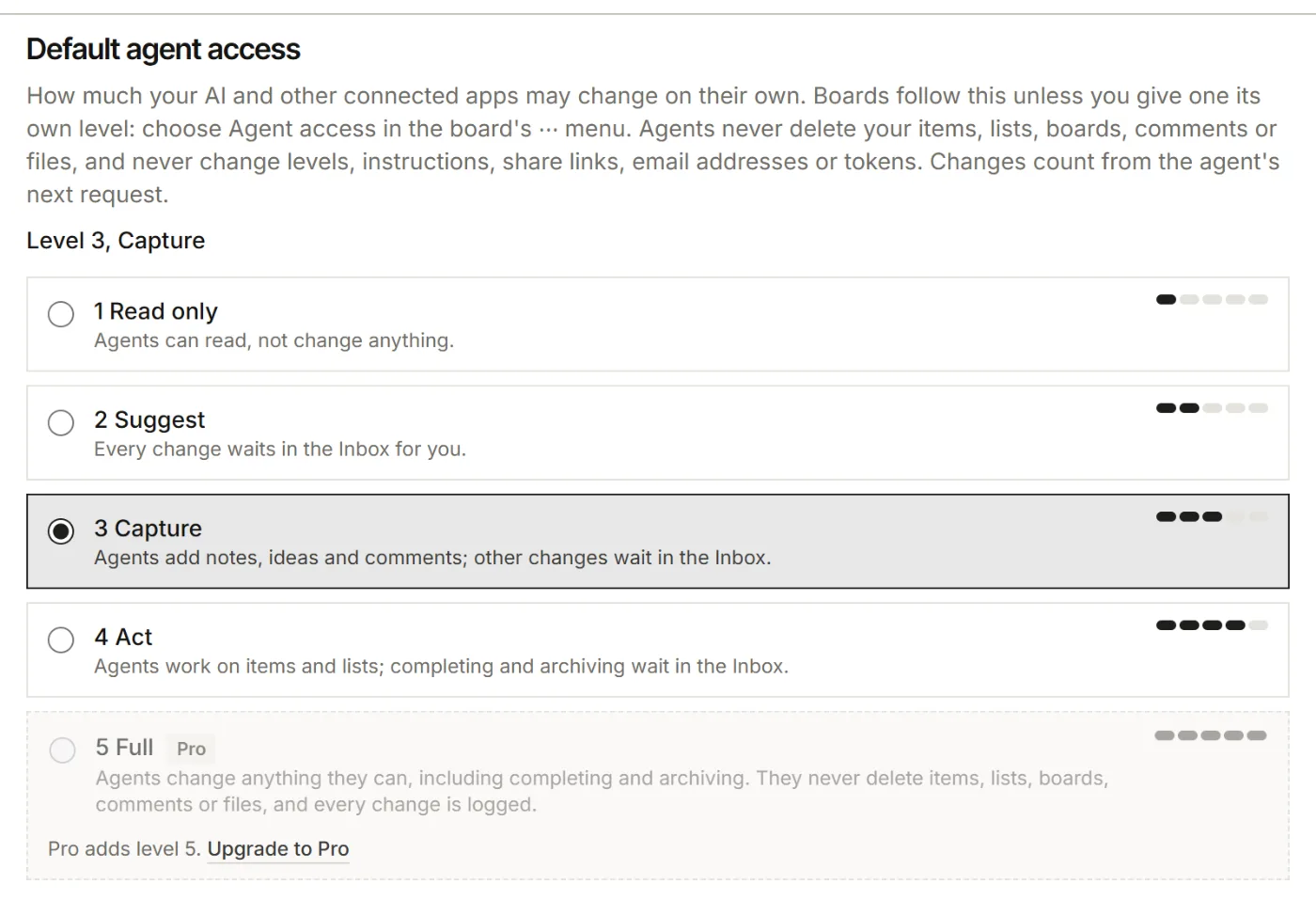
- In Listspace, open Settings, then Your AI, and check Default agent access. That level decides what the morning run may change on its own.
- At 4 Act it edits and moves items, while completing and archiving wait in the Inbox. At 2 Suggest every change waits. At no level do agents delete items, lists, boards, comments or files.
2. Schedule the task in Claude
- In Claude, click Scheduled in the sidebar, then New task, then Set up manually.
- Give it a name and choose On weekdays for how often it runs.
- Paste the prompt below, click Save, and run it once on demand to see the result.
Use Listspace to check my boards. Call catch_up for all my boards, then my_items. Where a board is behind, such as finished work still in a doing list or items waiting in Unsorted, bring it up to date as far as my agent access level allows. Anything above my level goes to the Inbox. Then give me a short list, with links: what changed since my last visit, what is overdue or due today, the requests and mentions waiting for me, and what waits in my Inboxes. End with the three things I should do first.In the new Claude experience you can also say in any conversation that you want this every weekday morning. Claude proposes the task, and you click Schedule.
3. Read the briefing
- Open Scheduled in Claude to find the latest run. Each run is its own session.
- Accept or reject what waits in the Inbox, on the board or in For you.
- Change the prompt or the cadence at any time: click into the task to edit it.
4. No schedule? Keep the prompt at hand
In ChatGPT, Gemini or any other app with Listspace connected, paste this when you sit down:
Use Listspace: catch me up on all my boards since my last visit, bring them up to date as far as my agent access level allows, and list what needs me today, with links.Good to know
- A Claude Code task includes all your connectors by default and uses their tools without asking during a run. Remove the ones it does not need. Your Listspace level still applies.
- Add "Then call end_session on each board you changed" to the prompt, and the run leaves a short summary on the board for your next session.
- No AI at all: Listspace's own Daily summary email is a short brief at the hour you choose: what needs you, what is due, what is coming up, what is stuck and what moved. Find it in Settings, then Notifications.
For your AI, this guide as markdown: listspace.app/guides/let-your-ai-check-your-board-every-morning.md